Home Office Electrical Points: Wiring a Work From Home Desk
Home office electrical points decide whether a work from home desk runs from fixed sockets or from a pile of extension leads. Below we plan the desk point by point: sockets, the study table switch board, USB and data, lighting, 16A loads, UPS and inverter backup and circuits, with the MRPs of the parts we make in Mumbai.
Key takeaways
- Sockets — four to six 6A sockets above the desk top, plus a USB charger for phones.
- Desk board — sockets, USB, RJ45 jack and a lamp switch on one plate; ₹1,609 for an 8M KEMPS board.
- Data — an RJ45 point at the desk, cabled from the router before the wall is closed.
- Heavy loads — laser printer, heater or kettle on a 16A point, never the desk spike guard.
- Backup — desk and router sockets on the inverter circuit; a UPS for a desktop.
Home office electrical points: the short answer
Home office electrical points are the sockets, chargers, data point, lights and switches a work-from-home desk needs: four to six 6A sockets above the desk, a USB charger, an RJ45 data point, a switch for the desk lamp, good ceiling and task lighting, and a 16A point if a printer or heater will be used.
Many homes now have a desk where someone works eight hours a day, often in a bedroom corner or a spare room that was wired for a bed and a wardrobe. The result is familiar: a laptop charger on an extension lead, a router on the floor, a monitor plugged into the bedside socket, and a phone charging wherever there is space.
This guide plans the desk the way an office would, but for a home: how many sockets, what the desk board carries, data and USB points, lighting, heavy loads, backup power and circuits, with the MRPs of the parts we make at our works in Marol, Andheri East, Mumbai. Workplace desks for offices and shops are covered in our separate office guide. Any wiring is a job for a licensed electrician, with the MCB switched off and the circuit tested dead first.
How many sockets does a work from home desk need?
A work from home desk commonly needs four to six 6A sockets above the desk top: one each for the laptop and monitor, one for a second monitor or desktop, one for the desk lamp, one for a router or printer, and one spare, plus a USB charger so phones do not take a socket.
6A sockets a home desk commonly needs
General practice by number of devices, not a rule or a test result. Each figure includes one spare socket; phones go on a USB charger.
List the plugs: laptop, monitor, desk lamp, router, printer, speaker or webcam hub. A desktop computer adds a UPS, which itself takes one socket and feeds the rest. Count one spare for the device you add next year.
If the desk already runs from a chain of extension leads, it needs more fixed sockets, not a bigger spike guard.
| Point | What it serves | Usual type | Our example (MRP) |
|---|---|---|---|
| 6A sockets, 4 to 6 | Laptop, monitor, lamp, router | 6A 3 pin with shutter | KEMPS K192, ₹110 |
| USB charger | Phone, earbuds, watch | 1M module, 2 A | VIZA V305, ₹650 |
| Data point | Laptop or desktop on cable | RJ45 jack | KEMPS K205, ₹284 |
| Desk lamp switch | Task light | 10AX switch | KEMPS K101, ₹65 |
| 16A point | Laser printer, heater, kettle | Universal socket | KEMPS K193, ₹205 |
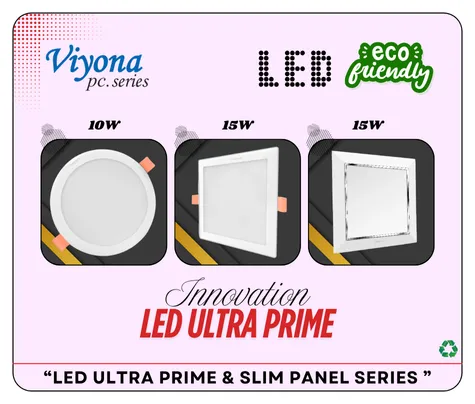
| Ceiling light | General room light | LED panel | VIYONA 1022 15W, ₹400 |
What should a study table switch board carry?
A study table switch board commonly carries two or more 6A sockets, a USB charger, an RJ45 data jack and a switch for the desk lamp or a wall light, all on one plate fixed just above the desk top, so every plug for the desk sits together and nothing runs across the floor.
An 8M KEMPS desk board at MRP
MRPs from our current catalogue, bars to scale with ₹750 as the full bar. Two 2M sockets, a 1M USB charger, a 2M RJ45 jack and a 1M switch fill 8 modules: ₹1,609 at MRP.
For more sockets, a 12M plate or a second board under the desk for chargers and the UPS keeps the top board tidy. Our plate size calculator works out the plate from the module count.
Above the desk top, plus one spare for next year.
Frees a socket; phones charge where you work.
A cable to the desk is steadier than Wi-Fi through walls.
Desk and router sockets on the inverter circuit.
Is a USB charger worth fitting at the desk?
Yes, a USB charger module at the desk is worth fitting because phones, earbuds and a smartwatch charge there every working day, and a module frees a socket and cannot be borrowed, though it needs a neutral at the desk board and charges at a standard rather than fast rate.
The VIZA V305 USB charger, rated 2 A, is ₹650 MRP; KEMPS K207 is ₹750. Both are 1M modules. Our catalogue does not describe them as fast chargers, so keep a 6A socket beside it for a fast charger or a laptop with a USB-C power adapter.
In a rented flat where the board cannot be changed, a spike guard with USB needs no wiring: our VIYONA Classic ABS spike guard, 1×4 on a 1.5 m cord with two USB ports (301), is ₹650 MRP. Wiring a module, and the neutral it needs, is covered in our USB socket for switch board guide.
Does a home office need an RJ45 data point?
A home office benefits from an RJ45 data point at the desk, because a laptop or desktop on a network cable holds a steadier connection for video calls and large uploads than Wi-Fi through walls, and the point costs little if the cable is pulled from the router position before the wall is closed.
KEMPS K205 is a 2M RJ45 modem jack with shutter at ₹284 MRP; VIZA V1256, a 1M RJ45 one line jack, is ₹189. Run the data cable in its own conduit from the router position to the desk board, away from the mains cables.
Our catalogue does not state a Cat5e or Cat6 rating for these jacks, so if you are laying Cat6 for speed, ask your dealer for the specification of the exact code. Jacks, colour codes and RJ11 versus RJ45 are in our RJ45 socket for switch board guide.
Even if you work on Wi-Fi today, a pulled cable to the desk is the cheapest insurance for the day a call keeps dropping.
Which lights does a home office need?
A home office commonly needs good general ceiling light for the room, a task light at the desk on its own switch, and lighting placed so it does not reflect off the screen or leave the face dark on video calls, which usually means light from the side or front rather than directly behind the person.
The ceiling light lights the room; a desk lamp or wall light lights the work. Put the desk lamp on a switch at the desk board so it can be turned off without reaching under the table. For the ceiling, our LED panels include the Ultra Prime 15W (1022) at ₹400 MRP; see the Ultra Prime and slim panel range.
Which colour and how bright are covered in our best light for study guide, and fittings per room in how many lights in a room. Avoid a light behind the screen or a window behind you on calls.
Where should the desk board be placed?
The desk board should sit on the wall just above the desk top, at the end where the laptop and monitor stand, not behind drawers or below the desk where it cannot be reached, with the exact height taken from the real desk, since a carpenter-built desk is often higher or lower than a standard one.
Common heights for study and work desks are in our switch board height from floor guide; we do not repeat them here. Three placement rules matter more: above the desk top, not behind drawers and clear of the monitor arm.
Decide where the desk goes first, including which side the window is on. A desk moved later means a board in the wrong place. If the desk might move, a second socket point on the other wall costs little at the wiring stage.
Which home office loads need a 16A point?
Home office loads that heat or draw a large starting current need a 16A point: a laser printer that warms up its fuser, a room heater used at the desk in winter, a kettle on a side table, or a large desktop with a UPS, while laptops, monitors, routers and lamps run comfortably on 6A sockets.
The usual 16A loads at a desk are a laser printer, a room heater and a kettle. Each should have a fixed socket, never a 6A socket through an adaptor. KEMPS K193, a 6A and 16AX universal socket with shutter, takes both plug sizes at ₹205 MRP; VIZA V263, a 16A socket on a porcelain base, is ₹160.
Our 6A vs 16A socket guide goes appliance by appliance, and the appliance power consumption chart lists typical watts.
A heater or kettle plugged into the desk spike guard is a common cause of a melted guard. Give it its own 16A socket.
UPS or inverter for working from home?
For working from home, a UPS keeps a desktop computer and router running through a short cut without a restart, while an inverter carries lights, fans and a few sockets through a longer outage, so many home offices use both: a UPS at the desk and the desk sockets on the inverter circuit.
A UPS switches over fast enough that a desktop does not reboot. An inverter runs for hours but is meant for lights, fans and small loads. A laptop on battery needs neither, but the router still does, or the call drops anyway.
Ask for the desk sockets and the router socket on the inverter circuit when the house is wired. Our UPS vs inverter guide compares the two, and inverter for home shows how backup circuits are split. We do not make UPS units or inverters.
Which circuit should a home office be on?
A home office desk is commonly wired on the room’s general socket circuit, with every socket earthed and protected by an MCB in the distribution board and an RCCB as your electrician advises, and any heater, AC or large printer given its own circuit so it cannot trip the computer mid-task.
A working earth matters for metal-cased desktops and monitors; our guide on how to check earthing at home lists safe checks. VIYONA 401 is a single pole 10 kA MCB, 6A to 32A, at ₹145 MRP, and the double pole 411 is ₹350.
The AC in a home office room follows the same rule as any bedroom AC: own circuit and MCB. Earth leakage protection needs an RCCB, which we do not make. Ratings by circuit are in which MCB for home.
Home office electrical mistakes to avoid
The most common home office electrical mistakes are working from a chain of extension leads, a desk board hidden behind drawers, no data point, a heater on the desk spike guard, a light or window behind the screen, and the router left off the inverter circuit, so the call drops when the power does.
Each is easy to fix before the walls are closed: chained extension leads board behind drawers no RJ45 at desk heater on spike guard light behind screen router not on backup.
If the desk is in a bedroom, the room’s other points are in bedroom electrical points. A home office used for clients or a small business may need more; our modular switches for office guide counts points desk by desk.
If a desk socket, charger or spike guard gets hot or smells of burning, unplug it if safe, switch off at the MCB and call a licensed electrician.
FAQs
How many sockets do I need for a work from home desk?
What should be on a study table switch board?
Do I need a 16A socket in a home office?
Is a wired internet point better than Wi-Fi for work from home?
Should my work desk be on the inverter?
Can I add sockets to my desk without breaking the wall?
Why buyers choose Vinayak Electricals
- Sockets, USB chargers, RJ45 jacks and switches for a desk board, made at our works in Marol, Andheri East, Mumbai.
- VIZA V305 USB charger at ₹650 MRP and KEMPS K205 shuttered RJ45 jack at ₹284.
- VIYONA spike guards with USB from ₹650 MRP for rented homes.
- LED panels for the ceiling, from our Ultra Prime and slim panel range.
- Every code and MRP in our e-catalogue; sold through 500+ dealers with delivery across India.
- Manufacturing in Mumbai since 1995; ISO 9001:2015 certified.
Set up your desk board
See VIZA switches, sockets, USB chargers and data jacks with codes and MRPs, then order through a dealer or call us.
View VIZA switches and sockets